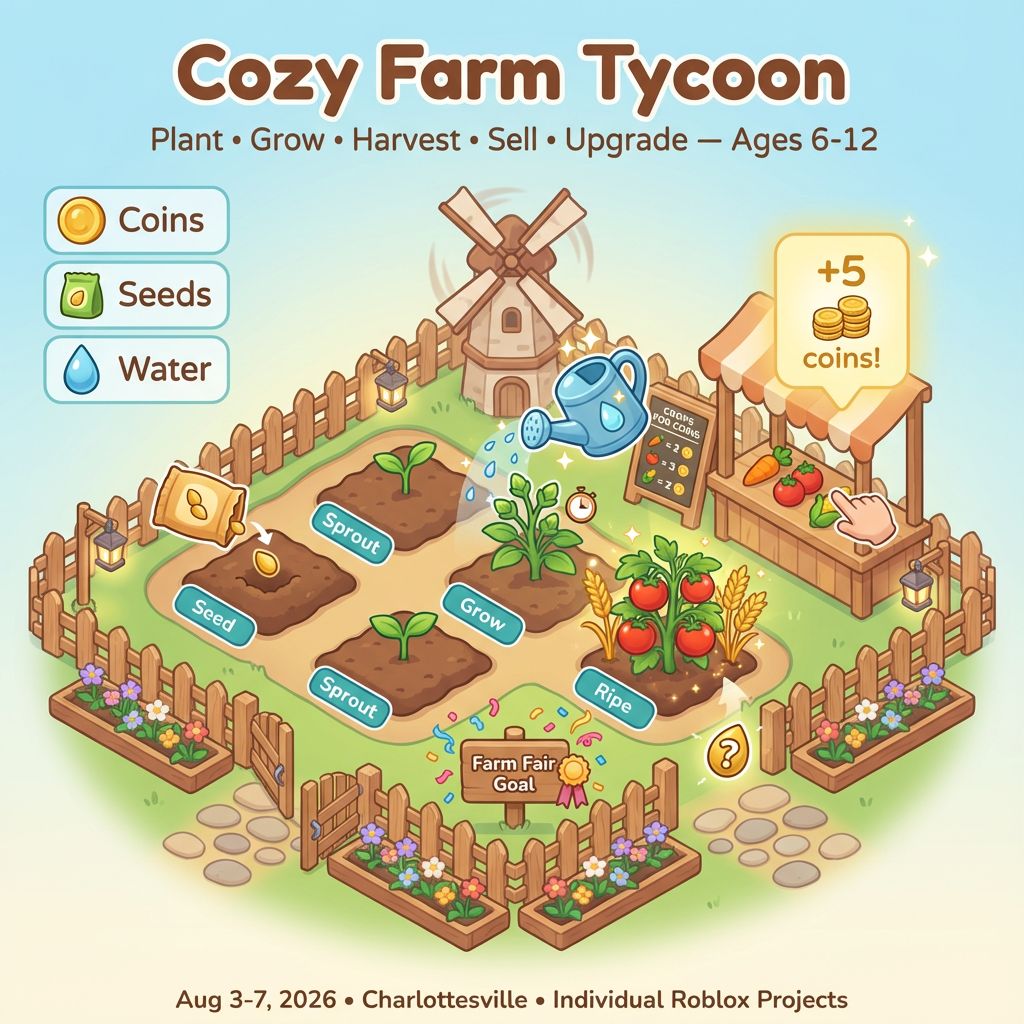
Cozy Farm Tycoon

Cozy Farm Tycoon

$509.99
Roblox Studio
was $599.99 Save $90
8/3/2026 - 8/7/2026 | Ages 6-12
Session Time
Gaming Option (Exploration Time)
Camper's Name
Enter your text
Camper's Age
Enter your text
Save this product for later
Have questions?
Cozy Farm Tycoon

Parents: Across five days, each child designs a gentle farm‑building tycoon in Roblox Studio. They’ll practice core CS ideas—events, variables, loops, conditionals, UI, and simple data tables—through age‑appropriate scripting. Every session includes “Try This First” and “Level Up” tracks to support a range of learners.

Students: Make your own Cozy Farm Tycoon! Plant seeds, water crops, sell produce, buy upgrades, and decorate your farm. By Day 5, your tycoon is ready to play and share!

Project Model

Each student builds a personal farm plot in their own Roblox place. Features stack into a complete loop: plant → grow → harvest → sell → upgrade → decorate. Helpers can share ideas, but every map and script is individual.

Daily Structure

  • 4 one‑hour sessions per day (S1–S4)
  • Individual projects with short, friendly peer playtests for feedback
  • Differentiation each session: “Try This First” and “Level Up” tasks

Day 1: Farm Start — Plots, Tools, and First Events

Outcomes: Create a cozy farm area with labeled plots and script a simple interactable tool.

  1. S1 Studio Setup Activities: Explorer/Properties tour; place grassy base, fences, signpost; anchor and organize folders (Farm, UI, Scripts).
  2. S2 Plot Builder Activities: Add 4 soil plots with clear borders and labels; color/material polish for readability.
  3. S3 First Event Activities: ClickDetector on a watering can or sign; on click, show a GUI hint “Press E to plant!”
  4. S4 Mini‑Showcase Activities: 1‑minute demo of your farm layout and one working interaction.

Level Up: Tween a gate to open when you enter; add cozy lanterns that turn on at “evening.”

Day 2: Plant and Grow — Variables, Timers, and States

Outcomes: Plant seeds, track growth stages with variables, and water to speed up growth.

  1. S1 Seeds Activities: Press E on a plot to plant; set plot.state = “seed”; show a tiny sprout model.
  2. S2 Growth Timer Activities: After N seconds, change to “sprout” then “ripe”; use a TextLabel above the plot for stage names.
  3. S3 Water Boost Activities: If watered, reduce remaining grow time; sparkle effect and a soft chime.
  4. S4 Test + Tune Activities: Adjust growth times for fairness; make sure buttons are easy to reach.

Level Up: Different crops with different times; evening lighting slightly slows growth; tooltip GUI for each crop.

Day 3: Harvest and Sell — Inventory, Shops, and UI

Outcomes: Harvest crops into an inventory, sell them at a market, and show coins on the HUD.

  1. S1 Harvest Activities: Interact with a ripe plot to collect 1 crop; reset plot to “empty”; +1 in an inventory table.
  2. S2 Market Stall Activities: Sell crops for coins at a stall; update a coins variable; show a “+5 coins!” popup.
  3. S3 HUD Activities: GUI shows Coins, Seeds, and Water; color‑coded for readability; big buttons for Grades 1–3.
  4. S4 Organize + Playtest Activities: Folders (Plots, Items, Market, UI, Scripts); neighbor test: “Is selling clear?”

Level Up: Price differences by crop; bonus for selling 3 of a kind; gentle “daily goal” label.

Day 4: Upgrades and Decor — Tycoon Loop and Balance

Outcomes: Add upgrade buttons and cozy decorations that affect play or looks.

  1. S1 Upgrades Activities: Buy “Bigger Watering Can” to water faster; “Fertilizer” for shorter grow times; disable buttons if not enough coins.
  2. S2 Decorations Activities: Place a windmill, flowers, or path stones; simple Tween on place for a satisfying pop‑in.
  3. S3 Balance Pass Activities: Tune crop times and prices; ensure upgrades feel helpful but fair; brighten lighting and add signs.
  4. S4 Iterate Activities: Two full plant→harvest→sell loops; rename and comment scripts; clear tooltips.

Level Up: “Easy/Normal” toggle adjusts grow times and prices; streak bonus for three timely waters in a row.

Day 5: Farm Fair — Win Flow and Showcase

Outcomes: Complete a cozy “Farm Fair” goal, add a win screen, and present your game.

  1. S1 Goal Activities: Set a milestone (e.g., earn 50 coins, buy 2 upgrades, decorate with 3 items); confetti on completion.
  2. S2 Polish Activities: Add a “Reset Day” button; soft ambient music; color pass for accessibility.
  3. S3 Practice Activities: Full test from fresh Play; check timers, selling, and upgrade locks.
  4. S4 Showcase! Activities: 1–2 minute demo: plant, water, harvest, sell, and buy one upgrade; show a helpful script. Badges: Green Thumb, Market Maven, Debug Star.

Level Up: Secret golden seed worth bonus coins; daily challenge board; screenshot “photo spot” with your farm sign.

Why Families Love This

  • For Parents: Clear progress, age‑appropriate scripting, and a shareable Roblox tycoon in five days.
  • For Kids: It’s your farm—plant it, grow it, and make it cozy!

Camp Essentials

  • Ages: 6 to 12 years old.
  • Dates: Monday, 8/3/2026 to Friday, 8/7/2026
  • Times:
    • Full-Day,8:30 AM–5:00 PM
    • AM, 8:30 AM - 1:00 PM
    • PM, 12:30 PM - 5:00 PM
  • Location: 2171 Ivy Rd, Charlottesville, VA 22903
  • What to Bring: Water bottle, lunch, and one or two light snacks.
  • Video gaming: Allowed with parent permission during Exploration Time
  • Tech Provided: Computers and robotics kits (for in‑camp use only; equipment stays with us).
  • Skill Level: Beginners welcome; no prior coding experience required
  • Dress Code: Comfortable clothes; indoor‑friendly shoes
  • Contact: camps@blueridgeboost.com • (434) 260‑0636
  • Allergies/Medical: Share details during registration; bring any necessary meds
  • Behavior & Safety: Kindness first; follow staff directions; internet safety rules apply

Note: The camps listed as ages 6 to 12 will be divided by age into two groups.

Show More
Powered by Lightspeed
Display prices in:USD
Skip to main content
Blue Ridge Boost
Classes for Adults
Classes
Camps
Events
Tutoring
Gift Card
Menu
Enrichment and tutoring in Math and Computing for any student who wants to learn. Led by Ana Nora Evans in Charlottesville, Virginia.
Terms & ConditionsPrivacy PolicyPayment PolicyRefund PolicyAbout UsReport abuse
Powered by Lightspeed